
Founders are usually great at the parts of the business that matter most: the product, the customers, the team. The digital plumbing underneath (the domain name, the DNS records, the hosting) tends to get set up once, in a hurry, by whoever was available, and then never thought about again.
The challenge is that those are the pieces that take everything else down when they fail.
As lead web designer at Psyche, I've seen how much time and money it costs when a company can't find, or can't get into, the accounts its website depends on. Almost none of it is technical. It's an ownership problem.
In an earlier article I covered how to choose the pieces of your digital ecosystem. This one is about keeping hold of them: which three accounts to treat as critical, and the short list of questions that tells you whether you're in good shape.
Your Domain Registrar: Treat It Like Your Bank Login
Your domain registrar is the company where your domain name is registered (GoDaddy, Squarespace, Namecheap and so on). Your website, your email, and every link you've ever shared point through that one account. If you lose it, you lose all of them.
Here's how it usually goes. A domain gets bought in the earliest days of the business, often by a cofounder or a freelancer, on a personal card, under whatever email address they had that week. Then the business grows up. The freelancer moves on. The cofounder's old address gets shut off. Nobody thinks about the registrar because nothing is visibly wrong.
Then the card on file expires. The renewal reminders go to an inbox nobody reads. And one day the website is gone, and so is email, and the first people to notice are your customers.
This isn't a hypothetical risk. ICANN's Expired Registration Recovery Policy requires registrars to send expiration reminders, but those reminders only help if they reach a person. Once a domain expires, its DNS is interrupted, which means your website and email stop working, and if it isn't renewed it can be deleted. There is a recovery window after deletion, but you don't want to be relying on it while your business is offline. Even ICANN's own guidance suggests giving your registrar a secondary email address that isn't tied to the domain, so reminders still arrive if the domain stops working.
The U.S. Small Business Administration makes the same basic point: registering a domain protects your brand only as long as you keep renewing it.
Here are a few easy steps you can take immediately to avoid future problems:
- Confirm your login credentials. An old account is likely due for a password change.
- Have at least two named admins on the account, and know who they are.
- Keep a current company card on file, and set a calendar reminder for the expiration date and the card's expiration date.
- Turn on auto-renew and, where your registrar offers it, a transfer lock.
- Turn on multi-factor authentication. Per CISA, any MFA is better than none, and this is one of the accounts where it matters most.
- Put the login in your company password manager, not in someone's memory or personal notes.
Your registrar login deserves the same care as your bank login. If you can't say today who owns that account, what email it's tied to, and what card is on file, that's your first task.
DNS Records: The Control Panel For Your Digital Ecosystem
DNS (Domain Name System) is the set of records that tells the internet where your website lives, where your email should be delivered, and which services are allowed to send messages on your behalf. Everything that makes your domain tick is governed by those records.
As a business owner, you do not need to understand how they work. That's what your web team or IT partner is for. But you do need to answer three questions:
- Where is our DNS managed? Sometimes it's at the registrar, sometimes it's at a service like Cloudflare, and sometimes it's with your hosting company. It's not always the same place as the registrar.
- Do I have admin access there? Not "my developer does." You do.
- Who else has access? Every person on that list can change how your site and email behave.
Why does this matter? Because DNS changes are small to make and large in their effects. One wrong edit can take email offline or point your domain at the wrong place. And when your marketing team sets up a CRM or an email platform, DNS is where the records that keep your messages out of spam folders get added. If nobody knows who manages it, that work stalls, or gets done by whoever happens to have a login and a guess.
You don't need to be the person editing DNS. But you need to be able to say where it's managed, and who can get in.
Hosting: The Keys to Your Office’s Front Door
Hosting is the server your website runs on. If your business manages its own hosting, ask yourself this: who has the login? If the honest answer is "just our IT person" (or one developer, or one agency contact), that's a red flag. Not because they're untrustworthy, but because a single point of access is a single point of failure. What happens if they're on vacation when the site goes down? What if they leave the company, or the agency, or the country? What if they simply stop answering?
At a minimum, the business itself should hold an admin login to the hosting account, with billing tied to a company email and card, and at least one other trusted person who can get in.
This is also why we offer managed hosting at Psyche. When something breaks, you're not hunting for a login or waiting on one person's calendar. You have a team that can get an issue resolved quickly, and the routine work (maintenance and updates, regular backups, security checks) is already handled. Get in touch with us if you’d like to hear more.
The Rest of the Ecosystem, Briefly
These three accounts come first because losing them takes everything else with them. But the same question ("who owns this, and who else can get in?") applies across the board:
- Business email (Google Workspace or Microsoft 365): the master key to password resets for nearly everything else.
- Your website's admin login (WordPress or another CMS): make sure it isn't tied to a former employee.
- Analytics and ad accounts: if an agency created them, confirm your company is the owner, not just a user.
- CRM and email marketing platforms: your customer data lives here.
- Social accounts: often created on someone's personal profile years ago.
The 30-Minute Ecosystem Audit
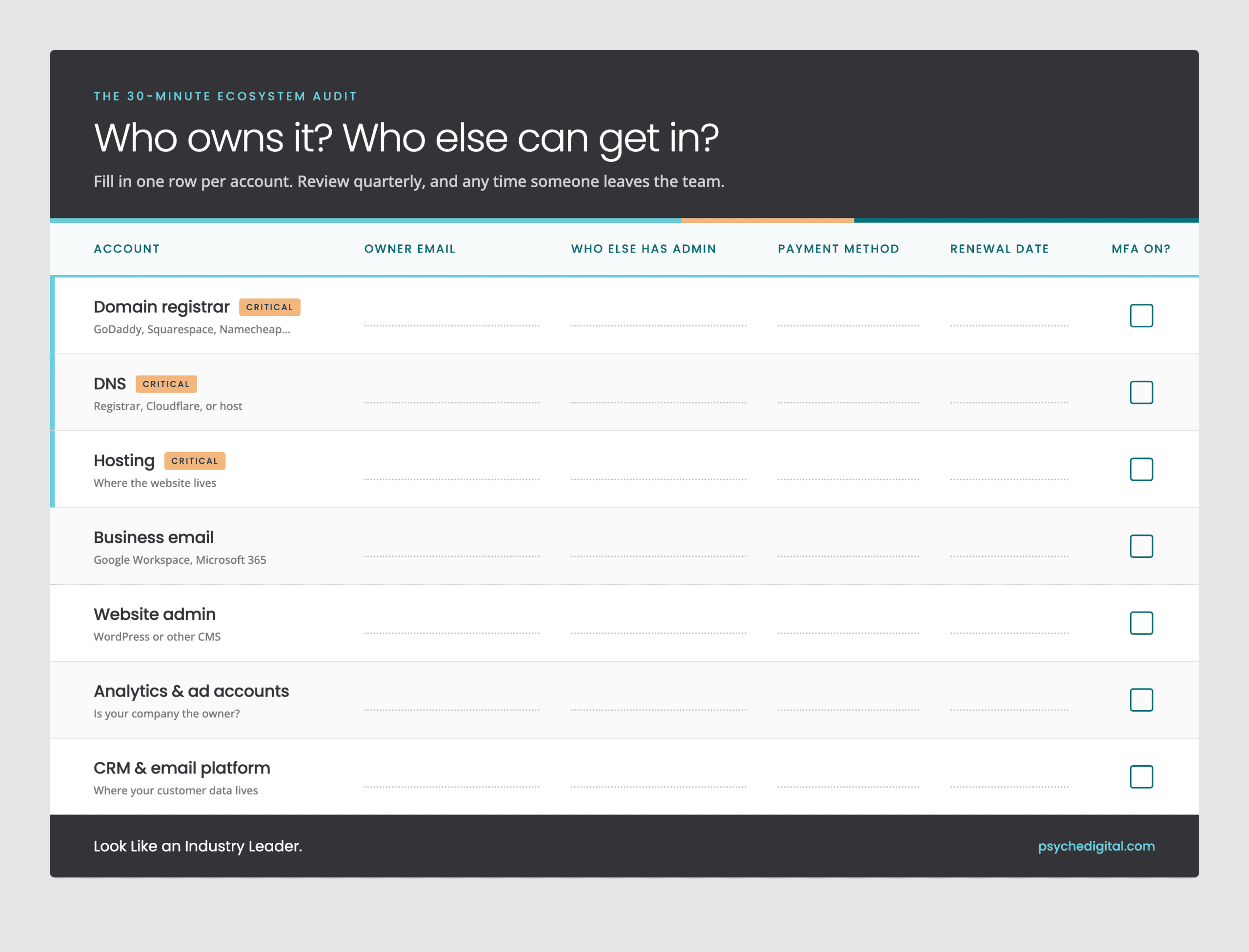
You can do this with a spreadsheet and a coffee. Build a simple inventory using this checklist (click here to download):
Then keep it healthy:
- Review it quarterly. Cards expire, people change roles, and renewals sneak up.
- Make offboarding part of the process. When someone leaves, removing their access should be on the checklist, and so should making sure nothing is only in their name. The SBA's cybersecurity guidance is a useful starting point for small businesses setting up these habits.
- Store the inventory somewhere safe, such as your password manager, with at least two people who know where it lives.
The Big Picture
Your digital ecosystem is a lot like the utilities in a building. Nobody thinks about them until the lights go out. The goal isn't to become a technical expert. It's to make sure that the business, not just an individual, owns each piece, and that more than one person can get in. Do it once, review it four times a year, and avoid learning about your registrar the hard way.
Want help talking through what your setup looks like today? Book an Ignite Call and we'll walk through it with you.